
Download Vista Toolbar icons – Vista style icons, modern icon set, software development, UI design, icon pack, Windows app design, developer tools
Overview
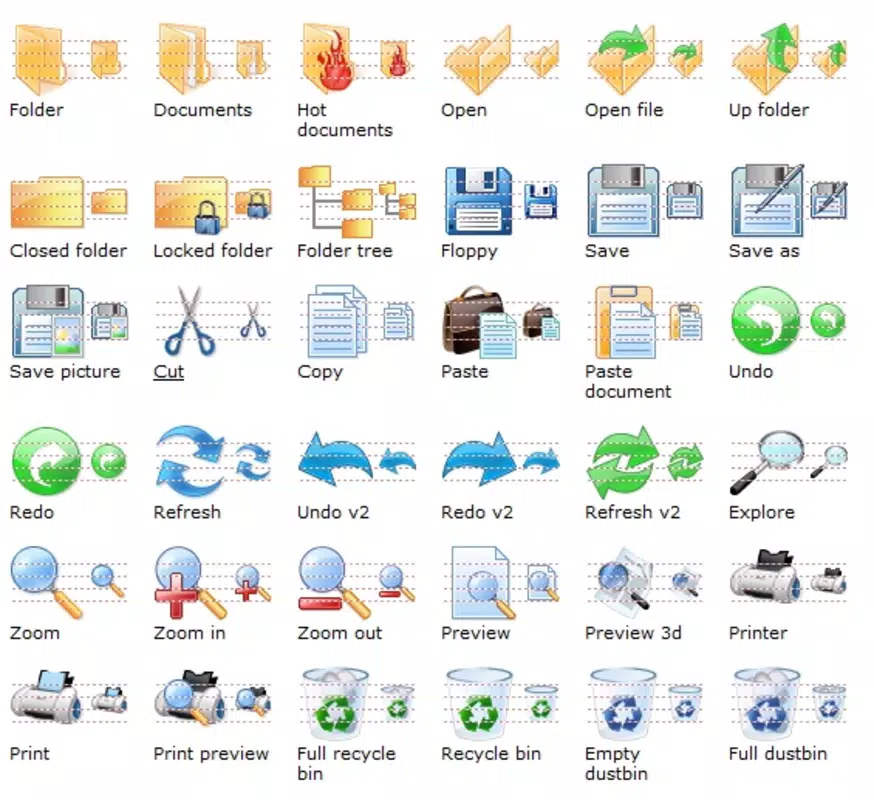
Vista Toolbar icons is a specialized icon set developed for software creators aiming to enhance the visual identity of their applications. Designed with a modern Vista-style aesthetic, this collection serves as a foundational tool for developers seeking to align their software with the clean, polished look associated with Windows Vista-era interfaces. The primary purpose of this icon set is to provide high-quality, consistent visual elements that improve the overall user interface of desktop applications. It addresses the common challenge of creating professional-looking software without investing significant time in custom icon design.
Target users include software developers, UI/UX designers, and independent creators working on Windows-based applications. The icon set is particularly valuable for projects requiring a cohesive, visually appealing interface that reflects contemporary design standards from its release era. Although the developer did not provide additional background on Vista Icons, the focus on consistent styling and practical usability suggests a targeted approach to serving development communities. Real-world use cases include integrating icons into toolbars, menus, and dialog boxes within productivity tools, system utilities, and desktop applications.
Within the broader app ecosystem, Vista Toolbar icons contribute to the availability of accessible, high-quality design assets. Its free distribution model supports open development practices and enables smaller teams or individual creators to produce polished software without financial barriers. The release date of April 1, 2008, situates it within a period of evolving interface design, making it a historically relevant resource for developers exploring retro or legacy-style UIs.
Key Features & Functionality
- Modern Vista Style Design: The icon set follows the visual language of Windows Vista, featuring soft shadows, smooth gradients, and a refined edge treatment. This design philosophy enhances the perceived quality of applications and ensures a consistent look across interface elements.
- Multiple Size Variants: Icons are available in 16x16, 24x24, 32x32, and 48x48 pixel formats. This range supports various interface contexts, from compact toolbars to larger application windows, allowing developers to maintain clarity and visual fidelity at different scales.
- High Color Depth Support: The icons utilize 256 colors and 32-bit color depth, ensuring vibrant, detailed visuals that render clearly on both standard and high-resolution displays. This supports professional-grade output across diverse hardware configurations.
- Developer-Friendly Integration: Designed for seamless incorporation into development workflows, the icons are structured to be easily embedded into software projects without complex setup. This reduces design overhead and accelerates development timelines.
- Consistent Visual Language: All icons share a unified style, including uniform stroke width, alignment, and iconography conventions. This consistency strengthens the application’s overall aesthetic and improves user comprehension of interface elements.
For example, a developer building a file management utility can use the 32x32 icons for main toolbar buttons and the 16x16 versions for compact views. The 32-bit color depth ensures that icons retain their sharpness even when scaled or displayed on high-DPI screens. The consistent styling helps users quickly recognize functions like “save,” “print,” or “delete” without relying on text labels, improving usability and accessibility.
Interface, UX & Performance
The Vista Toolbar icons are not a standalone application but a design asset intended for integration into software projects. As such, there is no user interface or interactive experience to evaluate in the traditional sense. Instead, the focus lies on how effectively these icons can be incorporated into an application’s UI without disrupting workflow or performance.
Although the developer did not list formal performance metrics, the small file size of 1.2 MB suggests efficient resource usage. The icons are likely optimized for quick loading and minimal memory footprint when embedded in applications. Their design prioritizes clarity and visual consistency over complex animations or dynamic behaviors, which aligns with the performance expectations of desktop tools.
Responsiveness and stability are inherent to the asset’s nature—since they are static image files, they do not introduce runtime instability. However, the actual user experience depends on how developers implement them within their software. Proper scaling and alignment ensure that icons remain legible and responsive across different screen sizes and resolutions.
For developers, the ease of use is a significant advantage. The absence of complex dependencies or runtime requirements means the icons can be deployed across projects with minimal friction. The visual quality supports a professional appearance, contributing positively to the end-user experience when used correctly.
Platform Compatibility & Technical Requirements
Vista Toolbar icons is designed exclusively for the Windows platform. It is compatible with Windows operating systems, though specific version requirements were not listed by the developer. The file size is 1.2 MB, which is compact and suitable for quick downloads and storage.
Given the release date of April 1, 2008, the icon set was created during the early adoption phase of Windows Vista. While it may function on modern Windows versions, compatibility with newer systems is not guaranteed without testing. The developer did not specify minimum OS requirements, so users should verify functionality on their target platforms.
As a static asset, the icon set does not require installation or runtime execution. It can be extracted and used directly within development environments. This makes it accessible to developers using various IDEs or graphic tools, provided they support common image formats.
Pros and Cons
- Free to download and use
- Modern Vista-style design with consistent visual language
- Multiple sizes for flexible integration
- High color depth ensures sharp visuals
- Small file size for efficient distribution
- Designed for easy incorporation into software projects
- Released in 2008, may not align with current UI trends
- No official support or update history provided
- Compatibility with modern Windows versions not confirmed
- Limited to Windows platform
- No documentation or usage guide included
- Not suitable for mobile or web applications
FAQ
Is Vista Toolbar icons available for free?
Yes, the icon set is provided at no cost. There are no licensing fees or subscription requirements for use.
Can I use these icons in commercial software?
While the developer did not specify commercial usage terms, the free distribution model suggests it may be permissible. However, developers should verify licensing details before deploying in commercial products.
Are the icons compatible with modern Windows versions?
The developer did not confirm compatibility with current Windows versions. While the icons may work on newer systems, testing is recommended for production use.
What file formats are included?
The specific file formats were not listed. The icons are likely provided in standard image formats such as PNG or ICO, common for Windows icon sets.
Is there a mobile version of this icon set?
No, Vista Toolbar icons is designed exclusively for Windows desktop applications. It is not intended for use in mobile or web environments.
Final Thoughts
Vista Toolbar icons remains a relevant resource for developers focused on Windows-based software with a clean, modern aesthetic. Its consistent design language, multiple sizes, and high visual quality make it a practical choice for enhancing application interfaces. While its age means it may not reflect current UI trends, its simplicity and reliability continue to offer value, especially for legacy projects or retro-themed designs.
For developers seeking a free, ready-to-use icon pack that integrates smoothly into their workflow, this set delivers tangible benefits without complexity. It supports faster development cycles and helps maintain a professional appearance across tools and utilities.
Download Vista Toolbar icons now


